Mosaizer Pro 12 -
Help |
Mosaizer Pro 12 -
Help
Single-cell mosaics
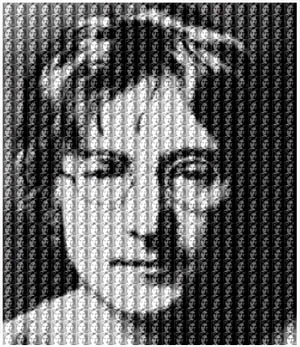
Single cell mosaics are a special type of photo mosaics: the picture is
rebuilt from a smaller version of itself. This feature only works with special
source pictures, preferably with little or no colours available. Greyscale
pictures are the best source for this feature. Settings for a successful single-cell
mosaic The best single-cell mosaic can be made from greyscale images. To activate
the single cell, check the tickbox. The other tickbox 'Automatic' is a very useful tool to
start with a fully automated and optimized setting to create a good first
single-cell mosaic. When unchecked you have to find your way around and tweak
and tune the single-cell mosaic. It is highly recommended to tweak and tune the
single-cell mosaic with the pre- and post-processing controls. For high values
of Colourize the 'Keep luminance'
should better be unchecked. The 'Automatic' sets the following values: The above picture is the result of an automatic setting, where only the
photo mosaic creation has been done twice. So: use the above settings, press
'Start', set the Brightness value in Post-processing
to 5, and then press 'Start' again. The
pre-processing values are applied twice. A different picture for the single
cell In some cases it's nice to use a different picture
for the single cell. To select such a different picture select 'Single cell picture' from the menu
bar 'Library'. This will prompt
for the location of the
picture. When a picture is selected the option is checked (and therefore active).
To deactivate the selected (different) single cell picture just click it, and the option
will be unchecked. You have to follow the same procedure every time the
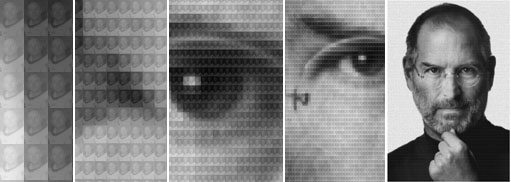
tickbox is unchecked. Some guidelines: Example: Steve Jobs' famous picture made with Neil
Armstrong's famous picture. the picture on the right is actually the
resized picture of the original mosaic of 6032 x 8924 pixels, with 250 cells on
the horizontal and vertical sides. That is equal to 1.39 x 2.06 m when printed
in
an industrial 110 dpi printer.
make sure the picture has the same
aspect ratio as the original
the best
effect is made with black and white sources, thus also the alternative
single source picture should be the same colour type as the original (either both
in colour or both in grayscale, but you are encouraged to try out
variants to see what happens)
the grayscale of the alternative picture may differ
from the original (e.g. more whites), so it's a bit of trial and error to
find a good setting, better start by using the 'Automatic'
values and tweak from there